
Website Structure for SEO: Why It Matters More Than Blogging

By Natalia Calderon

| 8 min read

| October 26, 2026

website structure seo best practices

Start with the foundation

“First you need to be findable, then you need to be relatable”

When a small business owner tells me they need more blog posts, I don’t start writing. I start with an audit of their website structure for SEO. And most of the time, what’s holding the site back is that the SEO basics haven’t been put in place.

Where I usually find the issue is in the structure. Headings picked because of how big the text looks. Pages Google never indexed. Images so large the page loads slowly. The site looks fine, so the owner never suspects anything is wrong.

Here’s the order I think about it in: first you need to be findable, then you need to be relatable. It doesn’t matter how good a post is if Google isn’t crawling it.

How headings organize your page

I explain heading structure to clients using a face. 

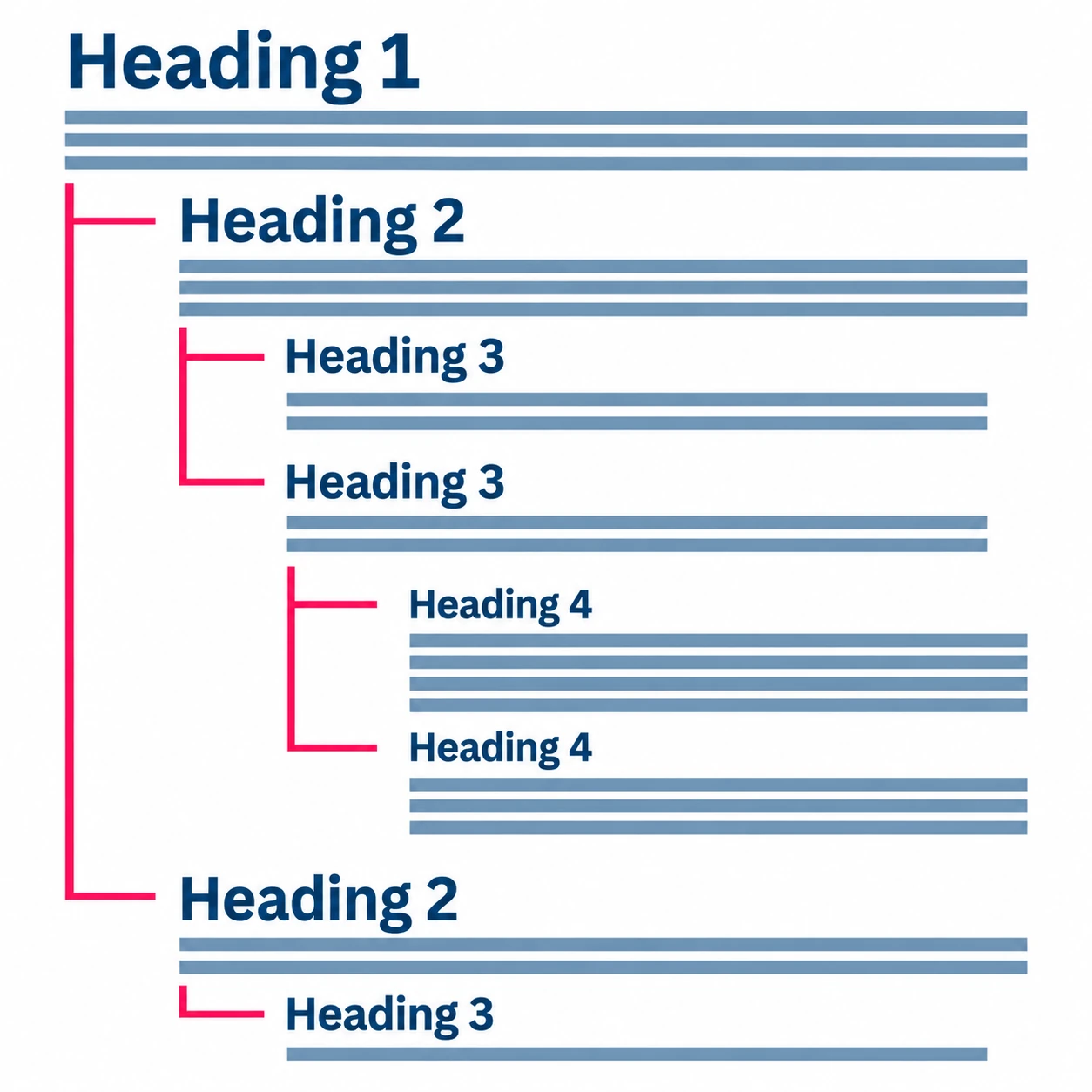
Your H1 is the face. It tells you what the whole page is about.

The eyes, nose, and mouth are your H2s. Each one is a main section.

Under the eyes, you have the H3s: the eyelashes and the eyelid. Under the mouth, your H3s are the teeth and the tongue. If you need to go further, the teeth can have H4s for incisors, canines, premolars, and molars.

Each part belongs under the one above it. You wouldn’t put the eyelashes in the mouth section, and the same goes for headings. Pick the level based on where the text belongs on the page, not on how good it looks.

Illustration of a correct Website Structure for SEO

Google reads your headings to understand what your page is about, the same way you read a face: the whole first, then the details. Screen readers use them too, so people who rely on one can move through your page section by section. Use one H1 per page to make the main topic clear, then organize the sections and details underneath it.

The good news is that you can fix your heading tags and keep your design. Choose the right level for each piece of text, then adjust how it looks.

Check your website structure for SEO basics

Headings are one part of it. Here’s what else I check before recommending more content. If you have access to the backend of your site, these are the basics you can check yourself.

Check which pages Google has indexed

Set up Google Search Console if you haven’t already. In there, you can check which pages Google has indexed and whether it’s having trouble crawling or indexing them. It’s free, and it also shows which searches bring people to your site and how often they click through from Google.

Meta title and description set on every page

Your page title and meta description help shape what people see on Google before they click. Write a clear title with your main keyword and a description that explains what they’ll find on the page. To check yours, open the SEO settings for each page in your website builder and look for empty descriptions or the same title used on more than one page. Google may show different wording, so search site:yourwebsite.com to see how your pages show up right now.

Main keyword in your headings

Start with your H1. It should clearly describe what the page is about. Use your main keyword where it fits naturally, including in other headings when it helps describe the section. You don’t need to repeat it in a set number of headings. To check, read only your headings from top to bottom: they should tell you what the page covers, and the keyword should sound natural when you read it out loud.

Headings nested in order

Use the face example above as your check. You should have one H1, H2s for the main sections, and H3s only under the H2 they belong to. Don’t skip levels, like placing an H4 directly under an H2.

Link related pages together

Your headings organize what’s inside each page. Internal links connect one page to another on your website.

If you mention a service in a blog post, link to the page where you explain that service. If another post answers a related question, link to it where that question comes up. Give the person reading a clear next step.

Use link text that tells people where they’re going. “Website design services” gives them more information than “click here.” These links also help Google find your pages and understand how they connect.

Add alt text and compress your images

Images that add information need alt text. It describes the image for people using screen readers and helps Google understand what the image shows. If an image is only there for decoration, leave its alt text empty so screen readers can skip it.

Pro Tip: Use your main keyword in the alt text when it accurately describes the image. The description needs to make sense first.

Compress your images before you upload them. Large files slow your page down, and smaller ones load faster for everyone, including people on slower connections. Page speed is also one of the things Google looks at.

Why depth beats posting more often

If a competitor blogs twice a week and outranks you, the posts aren’t the whole story. Once the basics in the checklist are in place, look at what your content actually gives the reader. Take two businesses writing about the same thing. One goes deeper, and not only deeper: it actually solves the problem it’s explaining. Solving the reader’s problem gives that post a better chance of doing well in search, but it isn’t the only thing that determines where it ranks.

Going deeper means the reader leaves with an answer they can use. Before you write a post, write down the question your reader came with, and make sure the post answers it all the way. If you already have posts, start there: pick one, find where the answer stops short, and finish it.

Conclusion: How the pieces stack together

None of these fixes work alone. A fixed heading or a new meta description won’t carry a site by itself. Each piece builds on the last. It has to be a compounding result, where the pieces stack together.

Search Console tells you which pages Google has saved. Your headings give each page a clear order. Your titles and descriptions help people know what they’ll find before they click. Internal links connect your pages to each other, and smaller images with alt text make them easier to use for everyone.

That’s the findable part. Once it’s in place, your content can do the relatable part, and that’s when writing more posts starts to make sense.


A few more questions

Frequently asked questions

Does it matter which website builder I use?

Not as much as you’d think. A builder that’s easy to edit doesn’t automatically make your site good for SEO. What matters most is the choices you make inside it: the headings you pick, the images you upload, and the information you fill in.

Yes. It depends on the size of the job, but anyone can do it with the right guidance. Some website builders feel more technical than others, not because the work is harder but because the interface isn’t as welcoming.

No. Fix your structure first, so what you write is easier for Google to find. Then write posts that go deep and actually solve your reader’s problem.

If your customers keep asking you the same questions, yes. A question and answer format gives them a quick answer, and it can make it easier for search engines and AI tools to understand your content and pull from it. Answer the questions people actually ask you.

Natalia Calderon Design Logo

Written by Natalia Calderon

Web designer and developer, building solutions for small businesses. English and Spanish.

Natalia Calderon Design Logo

FREE

Small Business Website SEO Checklist

free seo checklist

Free SEO Checklist for Small Business Websites

Keep the SEO basics in one place while you review your website. Start with indexing, page titles, headings, internal links, and images.

Stay up to date

A little help with your website, straight to your inbox.

Practical tips on web design, SEO, and running your business. Sign up for my newsletter.

Keep exploring

More website tips for your business

Your website doesn't have to be another thing on your list

If the structure needs more work than you have time for, I can help. Tell me about your business and what you need your website to do.